IS7 Session Management: How to Maintain Smooth Gameplay
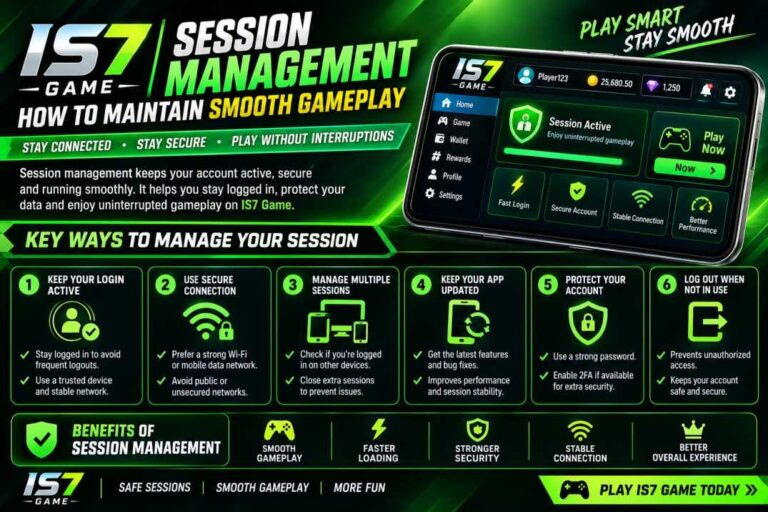
Smooth gameplay is not only about having a good internet connection or a capable Android device. The way a player manages each gaming session can also affect the overall experience. IS7 users can benefit from simple session-management habits that help keep the app organized, responsive, and comfortable to use.
An organized session means starting with a stable connection, checking the device, understanding the available options, and taking sensible breaks. It can also reduce unnecessary interruptions caused by background applications, low storage, outdated software, or poor network conditions.
This guide explains 14 practical ways to manage an IS7 session more effectively. The focus is on general app performance, device preparation, account awareness, responsible usage, and troubleshooting. These suggestions can help beginners and regular users build a smoother routine without making the process complicated.
Start Every IS7 Session With a Quick Device Check
Before opening IS7, take a few seconds to check whether your phone is ready. A device running many background applications may have fewer resources available for the active app. Closing unnecessary applications can help keep the phone responsive.
Battery level is another useful thing to check. If the battery is very low, performance may be affected on some devices, especially when power-saving features become active.
Quick checklist:
- Check battery level.
- Close unnecessary background apps.
- Make sure the phone is not overheating.
- Keep enough storage space available.
- Restart the device when it has been running for a long time.
A simple preparation routine can make the beginning of an IS7 session more comfortable.
Use a Stable Internet Connection
A reliable internet connection is important whenever an app depends on online communication. Wi-Fi and mobile data can both work well, but connection quality can change depending on location, network traffic, and signal strength.
If IS7 feels slow or repeatedly loses connection, check the network before changing other settings. Moving closer to a reliable Wi-Fi access point or switching between Wi-Fi and mobile data may help identify whether the connection is responsible.
Avoid starting an important session when your network is constantly dropping.
Good network habits include:
- Use a stable connection.
- Avoid weak Wi-Fi signals.
- Check mobile-data reception.
- Pause unnecessary downloads.
- Restart the router if other devices are also experiencing problems.
Keep the IS7 App Updated
Using an outdated version can sometimes cause compatibility or performance problems. Developers may release updates that improve stability, fix bugs, or make the app work better with newer operating-system versions.
Before updating, make sure the update comes from a source you trust. Avoid downloading unknown files simply because they claim to be a newer version.
For IS7, users should regularly check whether a legitimate update is available and review basic update information before installing it.
Before an update:
- Check the version number.
- Confirm the IS7 source.
- Make sure sufficient storage is available.
- Use a reliable internet connection.
- Restart the app after updating if necessary.
Keeping software current is one of the easiest maintenance habits.
Give Each Session a Clear Start and End
Session management becomes easier when you have a defined beginning and ending point. Instead of leaving the application open indefinitely, decide what you want to do before starting.
A structured approach can prevent unnecessary screen time and make your usage more organized. When the session is finished, close the app properly and return to other activities.
For users who frequently open IS7, this simple habit can also make it easier to notice unusual behavior. If the app starts behaving differently from one session to another, you can identify the change more quickly.
A clear session routine is useful for both beginners and experienced users.
Avoid Running Too Many Apps at Once
Modern smartphones can handle multiple applications, but keeping numerous demanding apps open at the same time can still affect performance.
If your IS7 session feels sluggish, check which applications are running in the background. Video streaming, large downloads, social media apps, and other resource-heavy processes can use memory, battery, or network bandwidth.
Closing applications that you do not need can create a cleaner environment for your active session.
Try to:
- Close unused applications.
- Stop large background downloads.
- Avoid unnecessary screen recording.
- Reduce multitasking during demanding sessions.
- Reopen the app if performance remains poor.
This is a simple step that does not require technical knowledge.
Monitor Device Temperature
Heat can affect smartphone performance. Long sessions, direct sunlight, charging while using demanding applications, and multiple background processes can all contribute to higher temperatures.
If your phone becomes unusually hot while using IS7, consider taking a break and allowing the device to cool naturally. Do not place a hot phone in a refrigerator or use extreme cooling methods.
Keeping the device in a comfortable environment is better for consistent performance.
Temperature-management tips:
- Keep the phone away from direct sunlight.
- Avoid covering the device with thick materials.
- Take breaks during long sessions.
- Avoid unnecessary background processes.
- Let the phone cool if it becomes unusually warm.
Keep Enough Free Storage Space
Storage space can influence the general health and responsiveness of a smartphone. When storage becomes nearly full, installing updates, saving temporary files, and managing applications can become more difficult.
Check your device storage regularly and remove files or applications you no longer need. Photos, videos, downloads, and old installation files can consume significant space over time.
For a better IS7 experience, maintain reasonable free storage rather than waiting until the phone displays a critical storage warning.
Useful storage habits:
- Remove duplicate files.
- Delete unnecessary downloads.
- Uninstall unused apps.
- Move important media to suitable storage.
- Check storage before installing major updates.
Understand Basic IS7 Account Settings
Good session management also includes understanding the account side of the application. Users should know how their account information is managed and should avoid sharing passwords, verification codes, or other private credentials.
If the app provides account or security settings, review them periodically. Use a strong password where applicable and avoid entering credentials on unfamiliar websites.
If you notice unexpected account activity, stop using questionable services and review your account-security options.
Account-safety basics:
- Keep login information private.
- Never share verification codes.
- Use a unique password when possible.
- Sign out on devices you do not control.
- Check account settings regularly.
These habits help make IS7 usage more secure and organized.
Manage Notifications During a Session
Frequent notifications can interrupt concentration and make a session feel less smooth. Messages, updates, social-media alerts, and other notifications may repeatedly appear over the active application.
You can use your phone’s notification or focus settings to reduce unnecessary interruptions. Keep essential notifications enabled while limiting those that are not important during your session.
This does not improve the app’s technical performance directly, but it can significantly improve the overall user experience.
A cleaner notification environment makes it easier to focus on the task you are currently performing.
Take Regular Breaks During Longer Sessions
Long continuous sessions can lead to tiredness and reduced concentration. Regular breaks give both the user and device an opportunity to reset.
A simple approach is to pause after a reasonable period, look away from the screen, stretch, drink water, and return only when comfortable.
A practical break routine can include:
- Pause after extended screen time.
- Look away from the display.
- Stretch your hands and shoulders.
- Drink water.
- Check the phone temperature.
- Resume only when you feel comfortable.
Session management is not only about technology; it is also about maintaining healthy usage habits.
Do Not Ignore Small Performance Changes
Minor problems can sometimes become more noticeable if they are repeatedly ignored. If IS7 begins taking longer to load, disconnecting frequently, or responding differently, try to identify the cause instead of immediately assuming the application is broken.
Check your internet connection, storage, device temperature, available memory, and application version.
A basic troubleshooting process is often enough to identify the problem.
Start with these checks:
- Test the internet connection.
- Close background applications.
- Restart IS7.
- Restart the device.
- Check available storage.
- Look for legitimate app updates.
Keeping track of when a problem occurs can also make troubleshooting easier.
Use Reliable Sources for App Information
When looking for information about IS7, be careful with websites offering modified files, unofficial downloads, or unrealistic claims. Not every page using the IS7 name is necessarily connected with the actual service or developer.
Before installing an application or entering account information, verify the source and review the available information carefully.
Users should avoid clicking suspicious advertisements, downloading unknown files, or providing sensitive details to websites they do not trust.
Source-checking habits:
- Verify the IS7 website or app source.
- Avoid modified application files.
- Do not share private account details.
- Check file information before installation.
- Be cautious of unrealistic offers or claims.
Good information habits are an important part of responsible session management.
Create a Consistent IS7 Usage Routine
A consistent routine can make regular app usage easier to manage. Instead of changing device settings every time, establish a simple checklist that works for your normal sessions.
For example, check the connection, battery, storage, notifications, and device temperature before beginning. After finishing, close the app and check whether anything unusual happened.
This routine only takes a few moments but can help users notice problems earlier.
A simple IS7 routine:
- Check your connection.
- Confirm sufficient battery.
- Close unnecessary apps.
- Start the session.
- Take breaks when needed.
- Close the app when finished.
- Review unusual errors or notifications.
Consistency is often more useful than complicated technical adjustments.
Finish Every Session Responsibly
The final step of good IS7 session management is knowing when to stop. Once you have completed your intended activity, close the application instead of leaving it running unnecessarily.
Review your account or session only when needed, keep private information secure, and avoid continuing simply because the application remains open.
Responsible usage also means understanding your own limits and following applicable rules and age requirements.
A good session should end as smoothly as it begins. By combining device preparation, reliable connectivity, regular breaks, security awareness, and sensible usage habits, users can create a more consistent experience.
Common IS7 Session Problems and Simple Checks
Sometimes a session may not feel smooth even when the device appears normal. A basic troubleshooting table can help identify common causes.
| Problem | Possible Cause | First Check |
|---|---|---|
| Slow loading | Weak connection | Test Wi-Fi or mobile data |
| App closes unexpectedly | Device resources | Close background apps |
| Update fails | Low storage | Check available space |
| Frequent interruptions | Notifications | Adjust notification settings |
| Phone feels hot | Long session or heavy workload | Pause and let it cool |
| Login difficulty | Account or connection issue | Check credentials and network |
| App behaves unusually | Outdated version | Check for a legitimate update |
These checks are general troubleshooting suggestions rather than guarantees. The exact cause can vary by device, operating-system version, and application version.
Quick Tips for Better IS7 Sessions
For users who want a short checklist, these five habits are a good starting point:
- Check your connection: A stable network can reduce interruptions.
- Keep the device ready: Maintain enough battery and storage.
- Update carefully: IS7 Use trusted sources for application updates.
- Take breaks: Avoid unnecessarily long continuous sessions.
- Protect your account: Keep passwords and verification information private.
Frequently Asked Questions
1. Why does my IS7 session sometimes feel slow?
Slow performance can have several causes, including weak internet connectivity, limited device resources, background applications, low storage, or an outdated app version. Start by checking the connection and closing unnecessary applications.
2. Should I restart my phone before using IS7?
A restart is not necessary before every session. However, if your phone has been running for a long time and several applications are behaving slowly, restarting may help refresh system resources.
3. How can I reduce interruptions during an IS7 session?
Review your phone’s notification and focus settings. Limiting non-essential notifications can reduce distractions while keeping important alerts available.
4. What should I do if IS7 keeps disconnecting?
First check your Wi-Fi or mobile-data connection. If the network appears stable, restart the application and check whether a legitimate update is available. Persistent problems may require additional troubleshooting.
5. Is taking breaks important during long sessions?
Yes. Regular breaks can reduce continuous screen exposure and give you an opportunity to rest. They can also allow a device that has become warm to cool down.
Conclusion
Effective IS7 session management does not require complicated technical knowledge. Small habits such as checking your internet connection, keeping sufficient storage available, closing unnecessary applications, maintaining account security, and taking regular breaks can make everyday usage more organized.
The most useful approach is to create a consistent routine. Prepare your device before starting, pay attention to performance changes during the session, and close the application responsibly when you are finished. If a problem appears, use basic troubleshooting steps before making major changes.
By following these 14 practical session-management tips, users can build a smoother and more controlled IS7 experience while maintaining sensible device, account, and usage habits.
18+ Notice:
This is not the official IS7 website and does not promote or endorse online gaming apps. This content is for general informational purposes only. Please use responsibly.